Keyboard Shortcuts
TrueFidelity supports a small set of standard shortcuts that map to the top menu bar. These are the most reliable keys across platforms because they are visible directly in the menus. If a command shows a shortcut on the right side of the menu item, it is supported in your current build.
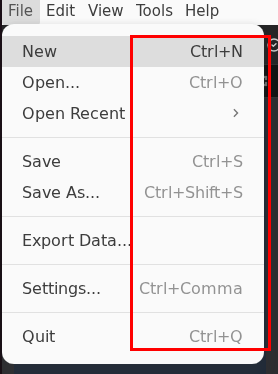
Core App Shortcuts
The shortcuts below come from the File menu and match the current UI. Use them for day-to-day navigation and file operations.
| Action | Windows/Linux | macOS | Notes |
|---|---|---|---|
| New System | Ctrl + N | Cmd + N | Opens the Create New System dialog. |
| Open | Ctrl + O | Cmd + O | Opens an existing system file. |
| Save | Ctrl + S | Cmd + S | Saves the active system. |
| Save As | Ctrl + Shift + S | Cmd + Shift + S | Saves to a new file. |
| Settings | Ctrl + , | Cmd + , | Opens application settings. |
| Quit | Ctrl + Q | Cmd + Q | Closes the app. |
How to Discover Shortcuts
- Check the menu bar. Each supported shortcut is shown on the right side of the menu item.
- Watch for tooltips. Some toolbar buttons and panel controls display hints when you hover.
- Use the UI first. If no shortcut is displayed, the action is likely mouse-only in this build.
Tips for Efficient Navigation
- Keep the File menu shortcuts in muscle memory, especially Save and Save As.
- When working in System Design, use the menu for New/Open while relying on the toolbar for run controls.
- Use View -> Reset Windows if the layout gets messy. This action does not currently expose a keyboard shortcut.
Notes on Customization
Some builds expose shortcut customization in settings, but the current UI does not show a dedicated shortcut editor. If customization becomes available in a future build, it will appear as an entry under Settings and will show a dedicated dialog.
Troubleshooting Shortcut Issues
| Problem | Solution |
|---|---|
| Shortcut does not work | Confirm the menu item still lists the shortcut in your build. |
| OS overrides the key | Check OS-level shortcuts and remap the conflicting key there. |
| External keyboard layout mismatch | Verify your keyboard layout (ANSI vs ISO) and test with a known shortcut such as Save. |
Related Pages
- Projects & Files - File operations and system storage behavior.
- Controls & Panels - How menu actions interact with the main panels.